A Bitget trading bot places buy and sell orders for you according to rules you set once: a grid bot trades a price range, a DCA bot buys in steps, a signal bot executes alerts from TradingVie
A Bitget trading bot places buy and sell orders for you according to rules you set once: a grid bot trades a price range, a DCA bot buys in steps, a signal bot executes alerts from TradingView. Bitget offers grid, Martingale, auto-invest, portfolio, trend-following and signal bots, and according to its bot guide they cost nothing extra: you pay the normal trading fees, plus funding and interest where leverage is involved. The futures grid bot works on USDT-M perpetuals with leverage of up to 150x, which is also where the largest risk sits.
Bitget trading bots: the key facts
- Bot types: spot grid, futures grid, position grid, spot and futures Martingale, auto-invest, Smart Portfolio, trend-following, funding rate arbitrage and the futures signal bot.
- Cost: no bot fee; standard trading fees of 0.1 percent on spot and 0.02 or 0.06 percent on futures apply.
- Leverage: the futures grid bot allows up to 150x on USDT-M perpetuals.
- No coding: every Bitget bot is set up in a few clicks through a guided screen in the app or on the website.
- Change: Bitget discontinued its custodial Futures Martingale bots on 12 October 2026, according to its bot page.
This guide explains which Bitget trading bot fits which market, calculates a grid bot on Bitcoin with today’s price and shows why too many grids lose money to fees. Bots trade on the same spot and futures markets as manual orders, so the costs in our overview of Bitget fees apply to every bot order. Bitget is not listed in ESMA’s register of crypto-asset service providers authorised under MiCA, so this guide is for readers outside the EU in countries where Bitget operates.
Bitget bots for spot and futures: which one fits which market
Every bot follows one strategy, and every strategy has a market in which it works and one in which it fails. Bitget sorts its bots by trading goal:
Your goal
Bitget bot
Market it is built for
Earn from prices moving up and down in a range
Spot grid, futures grid, position grid
Sideways, range-bound
Build a position step by step
Auto-invest, spot Martingale
Rising or fluctuating
Trade a range with leverage
Futures grid
Medium to high volatility
Hold several coins in fixed proportions
Smart Portfolio
Long-term, stable or rising
Follow indicators such as MACD or RSI
Trend-following bot, spot and futures
Trending, breakouts
Execute your own TradingView alerts
Futures signal bot
Any, signal-driven
Bitget names the spot grid and the auto-invest bot as the easiest starting points. Both work without leverage, so a mistake in the settings costs time and fees, not a liquidated position.
A note on names: Bitget has no product called DCA bot. Its bot guide files auto-invest and the spot Martingale under DCA strategies, and the futures grid and futures Martingale under leveraged DCA and grid strategies. Anyone looking for a Bitget DCA bot will find the auto-invest bot closest to the classic idea of buying a fixed amount at regular intervals.
Grid trading on Bitget: how the Bitget grid bot works in spot and futures
A grid bot divides a price range into equal steps and places a buy order at every step below the current price and a sell order at every step above it. When the price falls one step, the bot buys; when it rises one step again, it sells that amount with a profit of one step. Each completed buy and sell pair is one grid round.
- Spot grid: trades coins you actually buy, without leverage. The worst case is holding Bitcoin bought at higher prices when the price leaves the range at the bottom.
- Futures grid: runs the same logic on USDT-M perpetuals, long, short or neutral, with leverage. Here the worst case is liquidation.
- Trailing grid: moves the range along when the price leaves it, available for both spot and futures grids.
- Position grid: sets range and grid count itself once you enter the amount.
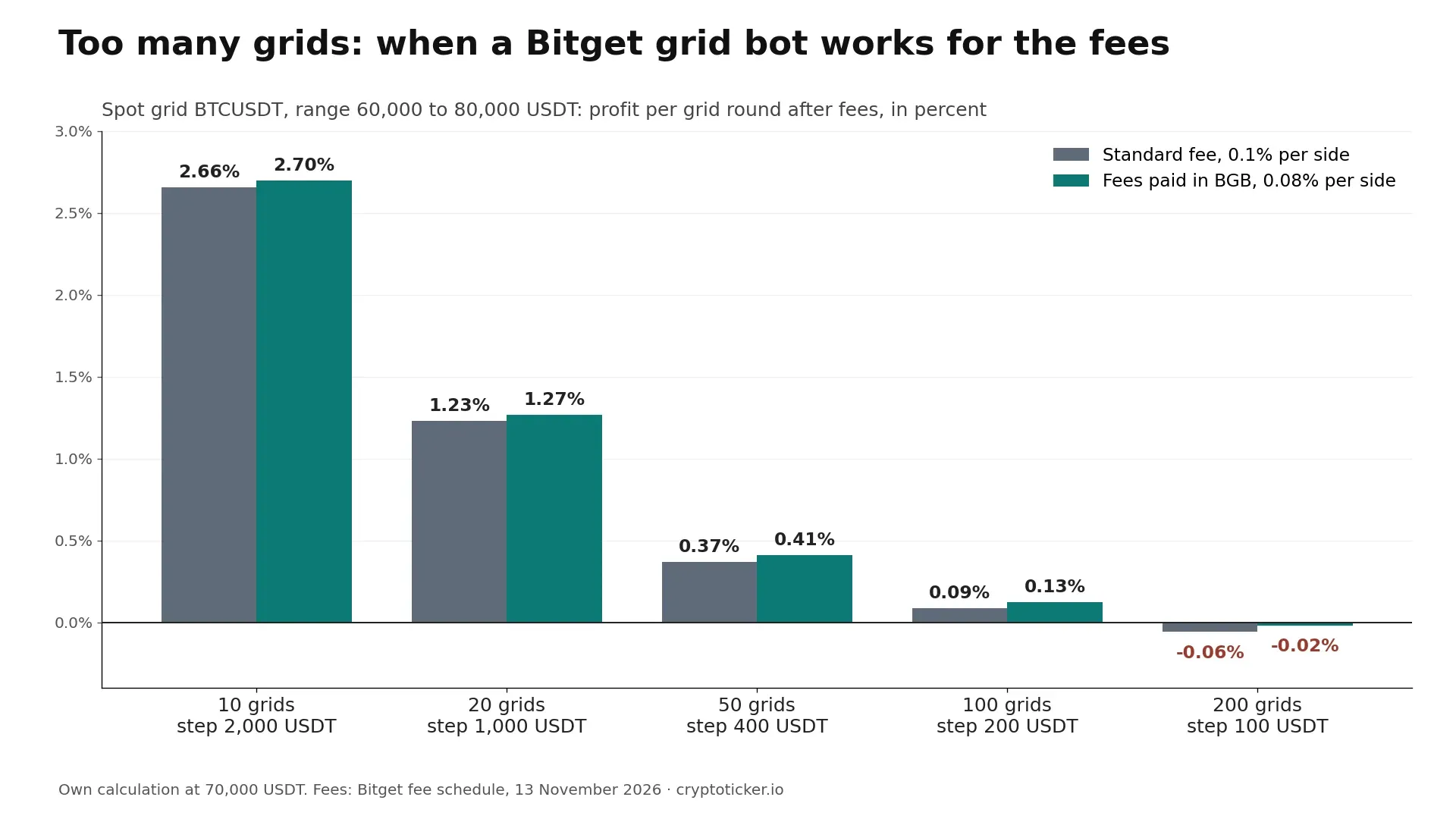
Profit per grid round after fees for a BTCUSDT spot grid from 60,000 to 80,000 USDT, by number of grids. Own calculation with Bitget fees, 13 November 2026
How many grids? A Bitget grid bot example with Bitcoin
The example uses a spot grid on BTCUSDT, Bitcoin against the Tether stablecoin USDT, between 60,000 and 80,000 USDT, a range around the Bitcoin (BTC) price of about $68,970 on 13 November 2026 (CoinMarketCap, 20:01 UTC). Every grid round pays the spot fee twice, once for the buy and once for the sell: 0.2 percent in total at the standard level, 0.16 percent if you pay fees in BGB.
Number of grids
Step size
Gross profit per round
After fees
After fees with BGB
10
2,000 USDT
2.86%
2.66%
2.70%
20
1,000 USDT
1.43%
1.23%
1.27%
50
400 USDT
0.57%
0.37%
0.41%
100
200 USDT
0.29%
0.09%
0.13%
200
100 USDT
0.14%
minus 0.06%
minus 0.02%
Profit per round is measured at the middle of the range, 70,000 USDT. Above about 142 grids in this range, a round no longer covers the standard fees; with BGB the limit lies at about 178. More grids mean more rounds when the price moves little, fewer grids mean more profit per round when it moves a lot. A step of at least 0.5 percent of the price keeps the fee share below half of the gross profit.
A grid strategy earns most in a sideways market that swings back and forth inside the range. In volatile markets that break out of it, the grid either holds coins bought at higher prices or sits in USDT, unless a trailing grid moves the range along. The bot settings therefore follow the market conditions: a wide range and fewer grids for a nervous market, a narrower range and more grids for a calm one.
Bitget trading bot fees: what you pay
Bitget charges no subscription and no fee for the bot itself; only the Bitget trading fees apply. Every order the bot places is a normal trade, so the costs depend on the market the bot trades.
Bot
Costs per order
Additional costs
Spot grid, spot Martingale, auto-invest, Smart Portfolio
Spot fee, 0.1% at the standard level, 0.08% with BGB
None
Futures grid, futures trend-following, futures signal bot
Futures fee, 0.02% maker and 0.06% taker
Funding every eight hours, paid between traders
For grid bots the trading fee is the decisive cost, because they trade often and earn small steps. External bot services that connect to Bitget through an API usually charge their own subscription on top of the exchange trading fees; Bitget’s built-in bots avoid that layer.
How to set up a Bitget trading bot in five steps
The setup follows the same pattern for every bot type. The example is a spot grid, the starting point Bitget recommends for beginners.
Step
What you do
What to watch
1
Open Trading bots in the app or on the website and choose Spot grid
Check which bots are offered in your country
2
Pick the pair, for example BTCUSDT
Liquid pairs fill grid orders more reliably
3
Set the lower and upper price and the number of grids
Keep each step well above 0.2 percent of the price
4
Enter the investment amount and the optional exit settings: stop-loss and take-profit
A stop-loss below the range limits the damage of a breakdown
5
Start the bot and follow it on the bot dashboard
You can stop it at any time; open positions are then settled at the market price
Bitget lets you run several bots at the same time on different pairs, as long as your balance covers them. Before you go live, you can practice futures trading with simulated funds in Bitget demo trading, the exchange’s form of paper trading.
Symbolic image, created with AI
Bot copy trading on Bitget
If you do not want to choose the settings yourself, Bitget offers bot copy trading: according to Bitget, you follow trading bots created by elite bot traders. Your bot then runs with the same settings as the original. Before you copy one, check the price range and the leverage the bot uses, because they decide your risk.
Copying human traders instead of bots works through Bitget’s copy trading for futures and spot, explained in our guide to Bitget copy trading.
Risks of Bitget trading bots
A bot executes rules without hesitation, in good and in bad markets. Good risk management starts with four risks:
- The price leaves the range. Below the range a spot grid holds coins bought at higher prices; above it the bot has sold everything and stops earning.
- Leverage in futures bots. At 20x, a 5 percent move against a futures grid consumes its margin, even before maintenance margin and fees are counted. How leverage and liquidation work is explained in our guide to Bitget futures trading.
- Martingale logic. Buying more as the price falls lowers the average price but enlarges the position in a falling market.
- Past performance. The returns shown for bots and bot traders describe the past and are no guide to future results.
Bitget’s bots run inside the exchange, need no API key and cost nothing beyond the trading fees. Independent bot platforms connect to your exchange account from outside and add their own automated tools, usually for a monthly fee.
Aspect
Built-in Bitget bot
External bot platform
Where it runs
Inside Bitget
On the provider’s servers; the bot connects through an API key
Cost
Bitget trading fees only
Subscription plus the exchange trading fees
Exchanges
Bitget only
Multiple exchanges in one dashboard, with all connected exchange accounts side by side
Strategies
Grid, Martingale, auto-invest, portfolio, trend, signal and funding rate arbitrage
Often custom strategies, AI bots and advanced trading terminals
Security
No key leaves the exchange
Depends on the API permissions you grant
Our comparison of the best crypto trading bots lists both kinds with prices and supported exchanges.
Connect Bitget to an external bot: API key, permissions and exchange account
An external bot trades on your behalf through an API key that you create in your Bitget account. Bitget’s API documentation describes how a Bitget API key works and how to keep it safe:
- Create the key under API Key Management on the website. Each user ID can create up to 50 API key sets, according to Bitget’s current quick start guide.
- Grant only the API permissions the bot needs. Classic keys distinguish read-only access for querying data such as market data, trade, transfer and withdraw. A trading bot needs read and trade permissions; withdrawal permissions are never required, and Bitget only allows API withdrawals from a whitelisted IP address.
- Bind an IP address. Bitget strongly recommends linking the key to fixed IP addresses; if the provider publishes its server addresses, enter them there.
- Store the passphrase. You set it yourself, and it can neither be changed nor recovered: if you lose it, you delete the key and create a new one.
- Delete a leaked key at once. API key, secret key and passphrase together give access to your account, and the leak of any one of them can cost you assets.
Once the bot connects, your Bitget funds stay on the exchange and every bot order appears in your trading activity like any other order. You can still trade manually in the same connected Bitget account, but keep manual trading and the bot on separate pairs, or the two will get in the way of each other’s position management.
If you are still choosing an exchange, our crypto exchange comparison shows which platforms offer built-in bots and at what fees. New Bitget accounts can be opened through Bitget’s sign-up page with our referral code already filled in; the conditions of the welcome pack are on our Bitget referral code page.
Where you can use Bitget trading bots
Bitget’s bots are available to eligible users wherever Bitget accepts customers, with the limits that apply to the exchange as a whole:
- European Union: Bitget is not listed in ESMA’s register of crypto-asset service providers authorised under MiCA (version of 11 November 2026). EU readers find licensed exchanges in our comparison of regulated crypto exchanges.
- Excluded countries: Bitget’s Terms of Use exclude, among others, the United States, Canada, Singapore, Japan, Hong Kong, Germany, France and Austria.
- Australia: ASIC has warned investors that Bitget’s crypto futures are not licensed there. Australians use the spot bots: spot grid, auto-invest and Smart Portfolio.
Bitget trading bot: our assessment
Bitget’s bot range is broad and free to use, and the spot grid is a sensible way to automate a clear view: “Bitcoin will move sideways between two prices for a while.” The bot does not create that view, it only executes it. Compared with manual trading, a bot wins on discipline and trade execution: it places every order at the planned price, around the clock, without hesitating. Manual trading stays stronger when news moves the market, because a bot keeps following its rules even when the market conditions behind them have changed. The grid example shows where most of the work lies: choosing a range that fits the market and a step size that leaves enough after fees.
Start automating with a spot grid or auto-invest, a small amount and a stop-loss below the range, and leave futures bots for later. Bots with leverage can lose the full margin within hours. This guide explains how the bots work; it is not investment advice.