OHO Wallets: How to add OHO network to MetaMask Wallet
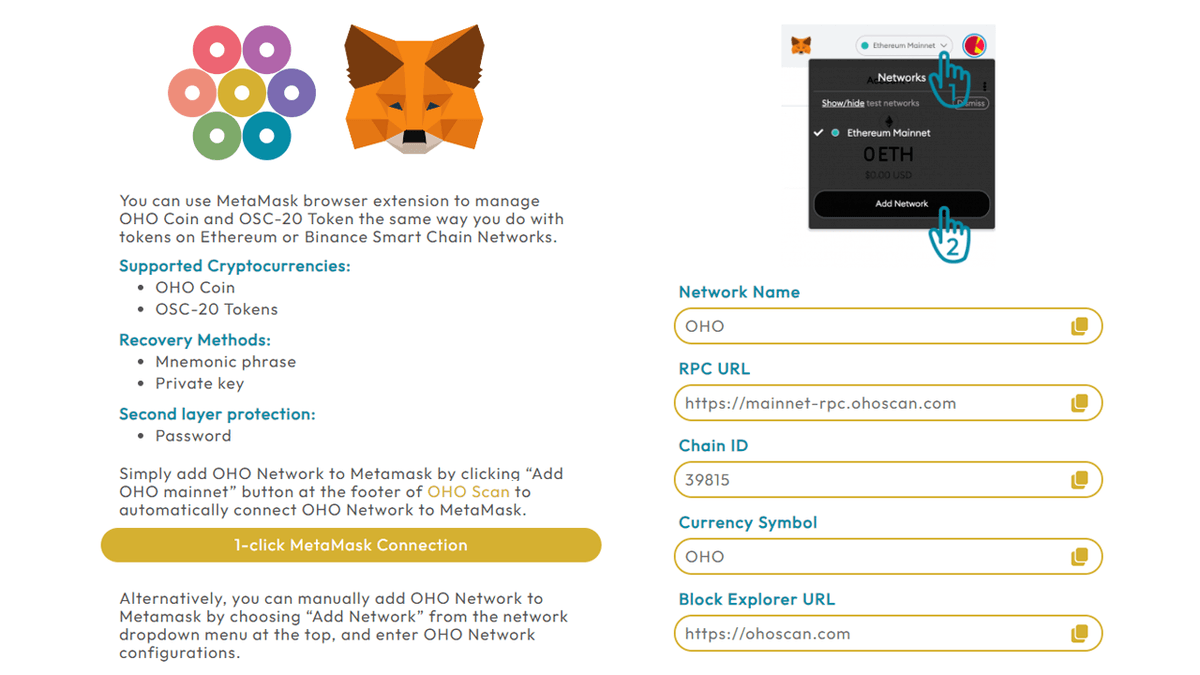
Anyone can use Metamask Mobile Wallet or browser extension to securely store OHO mainnet coin and any OSC20 tokens. Simply add Custom Network to MetaMask by using the network settings below:
A
AnonymousCryptoCompass newsroom
January 22, 2024
1 min read
NEWS
CryptoCompass editorial visual for guides coverage.
Anyone can use Metamask Mobile Wallet or browser extension to securely store OHO mainnet coin and any OSC20 tokens.
Simply add Custom Network to MetaMask by using the network settings below:
Once you’ve added OHO network to Metamask, you can now store, send, and receive OHO Coin and any OSC20 tokens on your mobile phone or computer.
Optional:
· To automatically add OHO Network to Metamask, you can just click “Add OHO mainnet” button at the footer of OHO Scan to automatically connect OHO Network to MetaMask.
Dragonfly managing partner Haseeb Qureshi has urged the Zcash community to wind down the protocol’s ZEC development fund after it expires under current rules in 2028, arguing the fund has gro
Anyone tracking the floki price prediction right now is watching a coin pressed against a ceiling that will not move. Deutsche Bank announced crypto custody for large clients on September 16,
Traders watching the bnb price prediction this week are staring at a board that just flipped. The Fed raised rates 25 basis points on September 16, the first hike since 2023, and BNB dropped