How Do PLX Network Security Features Protect User Accounts and Data? A crypto balance is only as safe as the account that holds it. For PLX Network users, that protection starts with very lit
How Do PLX Network Security Features Protect User Accounts and Data?
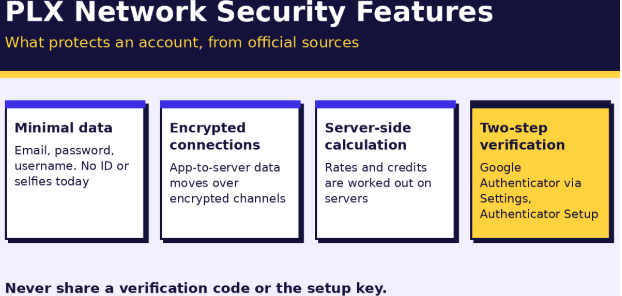
A crypto balance is only as safe as the account that holds it. For PLX Network users, that protection starts with very little data: an email, a password and a username, with no ID documents or selfies asked today. On top of that sit encrypted connections, server-side calculation and per-account access rules. The platform also urges users to add two-step verification through Google Authenticator.
This guide breaks down the PLX Network security features documented on the official website, the whitepaper and the X announcement, so readers can see exactly what protects an account and what still depends on the user.
Key Takeaways
PLX collects very little data: an email, a password and a username. It asks for no ID documents or selfies today.
The platform uses encrypted connections, server-side calculation and per-account access rules.
Users can add a second lock through Settings → Authenticator Setup, using Google Authenticator.
About PLX Network
PLX Network is a free mobile cloud mining app for Android. A user taps start, PLX's cloud servers run the session, and PLX is credited to the balance. No mining hardware, technical setup or money is needed to begin.
Total supply is capped at 1,000,000,000 PLX, with 55% reserved for mining rewards. The four-year mining phase began on 1 May 2026, and the network is now in Phase 2. The team also plans a wallet, a social app and PLX Chain, though most of these are still marked pending.
Source: official website.
PLX Network Security Features at a Glance
The table below gathers every documented protection. Some come from the whitepaper, others from the X announcement.
Feature
What it does
Where it is stated
Encrypted connections
Data travels between the app and PLX servers over encrypted channels
Whitepaper
Server-side calculation
Rates, bonuses and credits are worked out on servers, not on the phone
Whitepaper
Per-account access rules
Each account is limited to its own records, and team access is restricted
Whitepaper
Safer profile pictures
Uploads are screened, stripped of location tags, resized and re-encoded
Whitepaper
Strong passwords
Basic protection for the login
X post
Email verification
An extra identity check
X post
PIN verification
One more layer on the account
X post
Secure sessions
Helps protect logged-in sessions
X post
Two-step verification
A code from an authenticator app
X post
Less Data Collected, Less Data at Risk
PLX Network account security starts with a simple idea: data that is never collected cannot leak.
Signing up takes an email address, a password and a username. The official whitepaper says PLX does not ask for government ID, selfies or other identity documents today.
Identity verification (KYC) is planned for a later phase. PLX says it will announce it in advance, explain what it collects, and update its Privacy Policy before collecting anything.
What Happens Behind the Scenes
These PLX Network security features work quietly in the background, so most users never notice them.
Data moves over encrypted channels. Session rates, bonuses and credits are calculated on PLX servers, so nothing important depends on the user's device.
Database rules keep each account limited to its own records. Profile pictures are screened and cleaned of hidden metadata, such as location tags, before they are stored.
Two-Step Verification Benefits
A password on its own is a single lock. If someone guesses or steals it, the account is open.
Two-step verification adds a second check. The main benefits are simple:
It makes unauthorized access much harder, even if someone knows the password.
The 6-digit code is generated by the authenticator app on the user's own phone.
The announcement presents setup as a quick task.
PLX Network 2FA relies on an authenticator app, and the announcement names Google Authenticator.
How to Enable 2FA on PLX Network
This PLX Network 2FA setup guide follows the steps in the official announcement.
Open Settings. Go to Authenticator Setup in the app.
Verify email. Complete the email verification.
Connect the app. Scan the QR code in Google Authenticator, or type the setup key in by hand.
Confirm. Enter the 6-digit code from the app.
The announcement is clear on one point. The setup key must stay safe, and verification codes must never be shared with anyone. Two-step verification PLX offers is only as strong as the care taken with that key.
PLX Network Safety Tips
People wondering how to secure mobile app account access beyond 2FA can follow these habits:
Use a password that is not reused on any other service.
Remember that PLX staff will never ask for a password.
Ignore usernames that copy staff names or promise giveaways. PLX rejects them, but fake ones can still appear in direct messages.
Keep to one account. Bots, scripts, multiple accounts and fake referrals are prohibited and can lead to restrictions.
Official Announcements and Channels
PLX Network shares updates through its website blog and its social pages..
The official site links to X, Instagram, YouTube, Facebook, TikTok and Telegram. The blog also carries plain-English guides on mining, base rate decay and daily check-in rewards. A page claiming to be PLX that is not on this list deserves caution.
Account Control
Users can delete an account at any time from Settings → Delete Account. Personal data is removed within 30 days of the request. PLX keeps only minimal records needed for fraud prevention or legal reasons.
Final Thoughts
Good security is mostly small steps taken early. The published PLX Network security features cover the basics, and two-step verification is the one layer a user controls personally.
A few minutes in Settings is all it takes. The key is to set up the authenticator and keep the setup key safe.
Disclaimer: This blog is for information only. It is not financial, investment, legal or tax advice. The whitepaper itself says no system is perfectly secure. It also says the PLX shown in the app is a balance recorded by PLX Network with no guaranteed monetary value. Readers should confirm details on the official website before acting.